Healthcare workflow automation that takes the admin off your front desk
Intake forms, referrals, appointment changes, claims paperwork and records requests. We automate the administrative work around patient care, connected to the systems your practice already uses, so your staff can spend more time with patients and less time on paperwork.
Built for clinics, practices and healthcare businesses of 10–100 people. Clinical decisions always stay with your team.
Patient admin, automated
Intake form receivedOnline form and attached documentsRead
Patient record updatedPractice management systemNo retyping
Reminder sentAppointment confirmed by the patientConfirmed
Staff review exceptionsAnything unclear goes to a personYour call
Anything unusual goes to your team to review first.
Your staff spend their day on paperwork
Healthcare teams we talk to have the same problem: trained people spending hours on admin that has nothing to do with care.
Every hour spent on admin is an hour your team isn't spending with patients.
Retyping patient details from intake forms into the practice system
Sorting referrals that arrive by email, scan and portal
Calling and messaging patients to confirm, reschedule and remind
Preparing claims paperwork and chasing missing information
Answering the same questions in a shared inbox all day
Handling records requests one at a time
Which healthcare admin workflows can be automated?
Patient intake
Today
Details from intake forms and ID documents are typed into the practice system by hand.
Automated
Form data and documents are read, checked for missing information and entered into the patient record, with anything unclear flagged for staff.
Referral processing
Today
Referrals arrive in different formats and someone reads each one to work out what's needed.
Automated
Referrals are read as they arrive, key details are extracted, the patient record is created or updated, and the referral is routed to the right team.
Scheduling and reminders
Today
Staff confirm, reschedule and remind patients by phone and message.
Automated
Confirmations and reminders go out automatically, simple reschedule requests are handled, and only exceptions reach your front desk.
Billing and claims paperwork
Today
Claims information is gathered from several places and missing details are chased manually.
Automated
The information a claim needs is collected and checked for completeness before submission, with gaps flagged for your billing team.
Inbox and message triage
Today
Everyone works the shared inbox and decides who should handle what.
Automated
Messages are categorized (appointments, results, billing, general questions), linked to the right patient and routed, with suggested replies for routine questions. See inbox automation.
Records requests
Today
Requests are logged, checked and fulfilled one at a time.
Automated
Requests are logged and checked automatically, the right documents are prepared for approval, and the status is tracked until they're sent.
Every practice runs these differently. We map your version before building anything.
What changes for your team?
BeforeAfter
BeforeIntake forms are retyped
AfterPatient details arrive pre-filled for review
BeforeReferrals are read and sorted by hand
AfterReferrals are routed as they arrive
BeforeReminders take up the front desk's day
AfterReminders and confirmations run in the background
BeforeClaims are held up by missing details
AfterGaps are flagged before submission
BeforeThe shared inbox is everyone's job
AfterMessages are routed before anyone opens them
Clinical judgment stays with your team
Automation handles the admin. Anything clinical, and anything that needs a person's judgment, stays with your staff. You decide where the review points sit.
Human review where it matters.
When the AI isn't confident, or the stakes are high, the item goes to a person to check before anything is posted.
Rules, not guesswork.
We add validation checks (totals, formats, duplicates, matching against your records) on top of the AI.
A clear audit trail.
Every automated action is logged: what came in, what was extracted, what changed, and who approved it.
Your data stays protected.
We sign an NDA before we see your data, access is limited to what the automation needs, and we never use your data to train AI models.
Built for sensitive patient information.
We sign an NDA before we see any data, access is limited to the systems each automation needs, every action is logged, and patient data is never used to train AI models.
Works with the systems your practice already uses
Works with
Practice management and EHR systems
Through their APIs, integrations or data exports. We'll confirm what's reliable for your system during the assessment.
Email and messaging
Microsoft 365 / Outlook
Google Workspace
WhatsApp Business
Documents and forms
SharePoint
Google Drive
Dropbox
DocuSign
Accounting and billing
Xero
QuickBooks Online
Stripe
Spreadsheets and reporting
Excel
Google Sheets
Power BI
Using something not listed? If it can be reached, we can usually connect to it.
How it works
01
Audit
We follow a patient's journey through your practice, from first contact to follow-up, and see where your team's time goes.
02
Identify
We pinpoint the processes where automation will realistically pay for itself, and tell you which ones won't.
03
Build
We build the AI-powered automation, with checks and human review where the stakes are high.
04
Integrate
We connect it to the software your team already uses, so nobody has to learn a new tool.
05
Improve
We monitor it, fix issues, and expand it as your business changes.
Work we've delivered
Healthcare · Pakistan
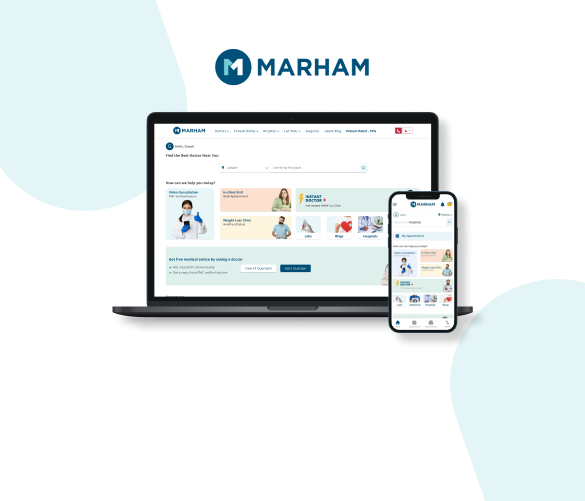
Marham: booking healthcare without the phone calls
Before
Finding and booking a doctor meant calling clinics, waiting on hold and hoping someone had a slot.
What we built
A platform where patients search 40,000+ doctors by specialty and city, book in-clinic or video appointments, pay securely, and get refunded automatically if the doctor is unavailable. Lab tests and medicine delivery are handled through the same platform, on web, Android and iOS.
Workflow automation in healthcare uses software, and increasingly AI, to handle the repetitive administrative work around patient care: intake, referrals, scheduling, reminders, claims paperwork, inbox triage and records requests. It gives staff more time for patients.
Is this the same as medical office automation?
It covers the same ground. Medical office automation usually means the front-desk and back-office admin of a practice: intake, scheduling, reminders, billing paperwork and records. That's the work we automate, built around the systems your practice already uses rather than a new platform your staff have to learn.
Will AI make clinical decisions?
No. We automate administrative work only. Anything clinical stays with your qualified staff, and any automated message to a patient follows the rules and wording you approve.
Can it work with our practice management system?
Most likely. Many systems offer APIs, integrations or exports. Where they don't, there are other approaches, and we'll tell you during the assessment what's reliable.
How do you handle patient data?
We sign an NDA before we see any data, limit access to what each automation needs, log every action and follow your data protection policies. Patient data is never used to train AI models.
Will patients notice a difference?
Only in a good way: faster confirmations, clearer reminders and quicker answers to routine questions. Messages go out in your practice's tone, from your usual address or number.
Where should we start?
Usually with intake or reminders. They're high-volume, predictable and take up a lot of front-desk time, so they pay back quickly.