Lead to customer
- Lead qualification
- CRM updates
- Follow-ups
- Client onboarding
AI-powered workflow automation
We automate the work your team shouldn't have to do manually, from the email arriving to the report going out, with AI connected to the software you already use.
Find What You Can AutomateYou don't need to know what to automate. Free assessment, no commitment.
It's necessary. It's repetitive. And it quietly eats a big part of your team's week.
If someone on your team does the same task over and over, there's a good chance at least part of it can be automated.
We don't start with a chatbot, an AI platform or a list of features.
We start with your business.
As a business process automation company, we learn how work actually gets done, find where automation genuinely makes sense, and build a solution around your existing systems, so your team doesn't have to change the way they work.
And if a process isn't worth automating, we'll tell you.
You don't need to know what should be automated.
Tell us what your team spends too much time doing. We'll identify what AI can handle.
Find What You Can AutomateWe automate whole processes, not just single tasks. These are the four we see most, with the steps inside each one.
Not sure where your process fits? That's normal: every business runs these a little differently, and we map yours before building anything. New to the idea? Read what business process automation is, with examples. Common starting points: automated lead qualification, client onboarding automation, inbox automation, document processing automation, invoice processing automation and reconciliation automation.
We work best with 10–100 person companies in the US, UK, Australia, the UAE and Saudi Arabia, whose work follows a familiar pattern: email → document → data → decision → approval → follow-up → report.
Client document chasing, receipt and bill processing, onboarding and month-end admin.
Client job, automated
Anything unusual goes to your team to review first.
Submissions, renewals, certificates, policy checks and a shared inbox that never empties.
Policy admin, automated
Anything unusual goes to your team to review first.
Patient intake, referrals, scheduling, claims paperwork and records requests.
Patient admin, automated
Anything unusual goes to your team to review first.
Client intake, document collection, matter updates, billing prep and a busy shared inbox.
New matter, automated
Anything unusual goes to your team to review first.
Proposals, client onboarding, timesheets and billing, research and client reporting.
Brief to project, automated
Anything unusual goes to your team to review first.
CV parsing, screening shortlists, interview scheduling, client updates and timesheets.
Application to shortlist, automated
Anything unusual goes to your team to review first.
Maintenance requests, tenant enquiries, lease documents, rent reminders and owner statements.
Maintenance request, automated
Anything unusual goes to your team to review first.
Shipping documents, quote requests, bookings, shipment updates and carrier invoices.
Shipment documents, automated
Anything unusual goes to your team to review first.
Onboarding checks, application intake, reconciliation, disputes and the reports that go with them.
Customer onboarding, automated
Anything unusual goes to your team to review first.
Admissions, enrollment, student records, inbox triage and certificates.
Admissions, automated
Anything unusual goes to your team to review first.
Orders from every channel, stock levels, supplier invoices, returns and customer service.
Order to report, automated
Anything unusual goes to your team to review first.
Applications and permits, records requests, correspondence and reporting.
Case admin, automated
Anything unusual goes to your team to review first.
Five steps from “we're doing too much manually” to automation that runs every day.
We learn how your work gets done today: who does it, in which systems, and how often.
We find the highest-value automation opportunities, and tell you honestly which ones aren't worth it.
We build the AI-powered workflow, with checks and human review wherever the stakes are high.
We connect it to the software your team already uses. No new tool for anyone to learn.
With Automation Care, our ongoing support plan, we monitor it, maintain it and expand it as your business grows.
No rip-and-replace. We connect automation directly to your existing software, so your team keeps working the way they do now.
HubSpot, Salesforce, Xero, QuickBooks, NetSuite, Microsoft 365, Google Workspace, Slack, Teams and many more. If your software can be reached, we can usually connect to it.
Start small. Prove the return. Then expand.
Automate a single repetitive job, like pulling data out of incoming invoices.
Connect several steps and systems, so work moves from inbox to CRM to report without anyone copying it across.
Automate an end-to-end operation, with your team stepping in only where judgment is needed.
Some automation only needs existing tools connected together. Some needs custom software, APIs, databases or AI systems. We have the engineering capability to build the complete solution when off-the-shelf automation isn't enough.
Our work includes: Marham · The Migration
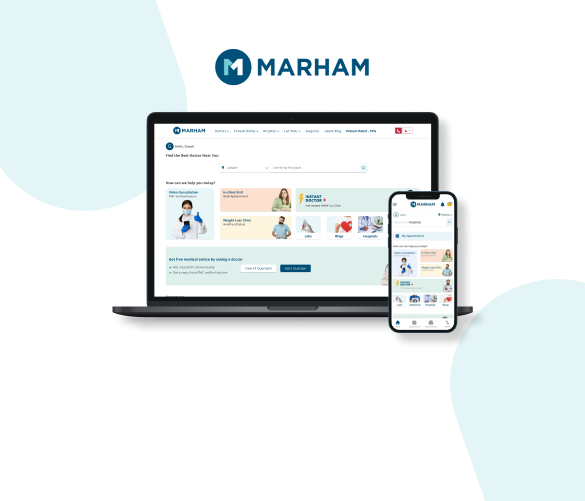
Healthcare · Pakistan
A platform where patients search 40,000+ doctors by specialty and city, book in-clinic or video appointments, pay securely, and get refunded automatically if the doctor is unavailable. Lab tests and medicine delivery are handled through the same platform, on web, Android and iOS.
Read the Marham case study →Business process automation services take a process your team runs by hand, such as onboarding a client, paying a supplier or turning an order into an invoice, and automate it end to end. The automation connects the software you already use, uses AI for steps that need reading or judgment, and keeps people in charge of anything high-stakes.
Business process automation is the goal: a whole process that runs with little manual work. AI is one of the tools that gets you there. It handles the steps that need reading, understanding or judgment, such as documents and emails, while simple rules and integrations handle the rest.
One that happens often, follows a pattern and takes up skilled people's time, such as invoice processing, client onboarding or order entry. Our free assessment identifies the best candidates and tells you which ones aren't worth automating.
We start with a free assessment. Automation projects are then quoted at a fixed price per process once we understand the work, with no hourly billing and no per-user fees. Ongoing monitoring and support is an optional monthly fee.
A single process typically takes 2–6 weeks from sign-off to go-live, including testing on your real data. Larger projects that connect several systems are scoped individually.
No. We connect the automation to the software your team already uses, such as your CRM, accounting system, email and spreadsheets. If something can't be connected, we'll tell you before you commit.
We sign an NDA before we see your data, limit access to what each automation needs, log every automated action, and never use your data to train AI models.
Tell us what your team spends too much time doing.
We'll help you determine whether it can be automated, what it would take, and whether the numbers make sense.
Find What You Can AutomateFree assessment · No commitment · NDA available · Your data is never used to train AI