

Automated Lead Qualification

Automated lead qualification that gets the right enquiries to the right person, fast

Enquiries come in from your website, email, ads and phone calls. AI reads each one, checks it against what makes a good fit for you, fills in the gaps, updates your CRM and routes it to the right salesperson with a short summary. Your team spends its time on the leads that can become customers.

For sales and client-intake teams in service businesses. Works with the CRM you already use.

A common starting point within business process automation. Qualification is the first step from lead to customer, and we can automate the follow-ups and onboarding after it too.

Lead, qualified

  1. Enquiry receivedWebsite form, email or adCaptured
  2. Checked against your criteriaNeed, size, location, timingGood fit
  3. CRM updatedContact, company and sourceNo retyping
  4. Routed to a salespersonWith a two-line summaryRouted

Anything unusual goes to your team to review first.

Your best leads are waiting behind the ones that will never buy

Good leads go cold while your team sorts through the rest.

  • Reading every enquiry to decide whether it's worth a call
  • Spending discovery calls on people who were never a fit
  • Copying enquiry details from forms and emails into the CRM
  • Looking up each company before anyone can reply
  • Deciding by hand who should take each lead
  • Following up late, after the lead has already spoken to someone else

What parts of lead handling can be automated?

  • Capturing enquiries from forms, email, chat and ads
  • Eligibility and fit questions before the first call
  • Scoring against your own criteria
  • Company and contact research
  • Duplicate checks and CRM updates
  • Routing by service, region, size or availability
  • Booking the first call
  • Follow-up emails and reminders
  • Polite replies to leads that aren't a fit
  • Reporting on lead sources and conversion

We use your definition of a good lead, not a generic score.

How does automated lead qualification work?

  1. Capture

    Every enquiry is collected in one place, whether it came from a website form, an email, a chat, an ad or a call note.

  2. Understand

    AI reads the enquiry and works out what the person needs, even when they describe it in their own words.

  3. Enrich

    It fills in the gaps from your records and public information: the company, its size, and whether they're already a customer.

  4. Qualify

    The lead is checked against your criteria and scored, with the reasons written down so your team can see why.

  5. Route

    Good leads go to the right salesperson with a short summary and a suggested next step, following your routing rules.

  6. Follow up

    The first reply or booking link goes out quickly, reminders are scheduled, and leads that aren't a fit get a polite answer.

Our process: Audit → Identify → Build → Integrate → Improve. How we work

Why points-based scoring isn't qualification

Most CRMs can add points for a job title or a page visit. That tells you who is active, not who is a good fit.

Points-based lead scoring compared with AI lead qualification
Points-based lead scoringAI lead qualification
Reads what the person actually wroteNoYes
Uses your own fit criteriaOnly as fixed pointsYes, including the judgment calls
Fills in missing company detailsNoResearches them
Explains the decisionA numberA short written reason
Handles enquiries from email and callsUsually forms onlyEvery channel
Keeping it accurateManual re-weightingTuned with your team's feedback

You stay in control

  • Human review where it matters.

    When the AI isn't confident, or the stakes are high, the item goes to a person to check before anything is posted.

  • Rules, not guesswork.

    We add validation checks (totals, formats, duplicates, matching against your records) on top of the AI.

  • A clear audit trail.

    Every automated action is logged: what came in, what was extracted, what changed, and who approved it.

  • Your data stays protected.

    We sign an NDA before we see your data, access is limited to what the automation needs, and we never use your data to train AI models.

  • Your team decides who to take on.

    Automation qualifies and prioritizes. Nothing is turned away without rules you've approved, and borderline leads always go to a person.

Works with your CRM, forms and inbox

We connect automation directly to your existing software, so your team keeps working the way they do now.

  • CRM
  • ERP
  • Accounting software
  • Email and shared inboxes
  • Databases
  • Spreadsheets
  • Document storage
  • Internal software
  • APIs
  • Communication platforms
  • Existing AI tools

No API? No problem. If your software can be reached, we can usually connect to it, and if it can't, we'll tell you before you spend anything.

Works with

  • HubSpot
  • Salesforce
  • Xero
  • QuickBooks Online
  • NetSuite
  • Microsoft 365 / Outlook
  • Google Workspace / Gmail
  • Slack
  • Microsoft Teams
  • SharePoint
  • Google Drive
  • DocuSign
  • Excel
  • Airtable
  • Monday.com
  • Zendesk
  • Power BI
  • Shopify

  • HubSpot
  • Salesforce
  • Pipedrive
  • Zoho CRM
  • Microsoft Dynamics 365

  • Xero
  • QuickBooks Online
  • Sage
  • NetSuite
  • Microsoft Dynamics 365 Business Central
  • MYOB
  • SAP Business One
  • Zoho Books
  • FreeAgent

  • Microsoft 365 / Outlook
  • Google Workspace / Gmail

  • Slack
  • Microsoft Teams
  • WhatsApp Business

  • SharePoint
  • OneDrive
  • Google Drive
  • Dropbox
  • Box
  • DocuSign

  • Excel
  • Google Sheets
  • Airtable
  • PostgreSQL
  • MySQL
  • Microsoft SQL Server

  • Monday.com
  • Asana
  • ClickUp
  • Jira
  • Notion

  • Zendesk
  • Freshdesk
  • Intercom

  • Power BI
  • Looker Studio
  • Tableau

  • Shopify
  • WooCommerce
  • Stripe

  • Zapier
  • Make
  • n8n
  • Microsoft Power Automate

  • ChatGPT / OpenAI
  • Claude
  • Microsoft Copilot
  • Google Gemini

Example: from enquiry to booked call

Illustrative example

Before

A consultancy gets a steady stream of enquiries through its website and inbox. A partner reads each one, looks up the company and forwards it to whoever seems right. Some enquiries wait days for a reply, and many discovery calls turn out to be with people who were never a fit.

After

Each enquiry is read on arrival, the company is looked up, and the lead is checked against the firm's own criteria. Good fits are added to the CRM, routed to the right partner with a two-line summary, and sent a booking link straight away. Enquiries that aren't a fit get a helpful reply, and the partners spend their time on the calls worth having.

Work we've delivered

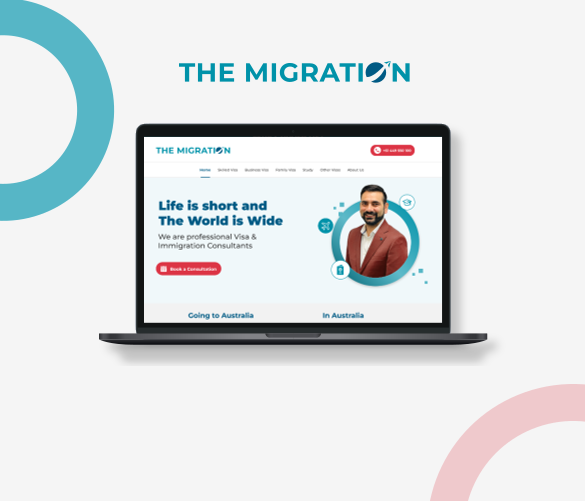
The Migration website on desktop, tablet and mobile

Professional services · Australia

The Migration: qualifying visa enquiries before the first call

Before
Every enquiry started with a consultant working out, by phone, whether the person was even eligible.
What we built
A website with a self-serve PR points calculator and a personalized PR pathway roadmap, so prospective clients check their eligibility first, then book a consultation online.
Read the The Migration case study

Automated lead qualification: common questions

What is automated lead qualification?

Automated lead qualification uses software, and increasingly AI, to decide which enquiries are worth your sales team's time. It reads each enquiry, checks it against your criteria, fills in missing details, scores it and routes it to the right person, so good leads get a fast response.

How is AI lead qualification different from lead scoring?

Lead scoring adds points for things like job titles or page visits. AI lead qualification reads what the person actually wrote, checks it against your definition of a good fit, and explains its decision in plain words. Many teams use both.

Is this lead management automation?

Partly. Lead management automation covers the whole path from enquiry to customer. We usually start with qualification and lead routing automation, then automate follow-ups, CRM updates and client onboarding once that works.

Will leads be turned away automatically?

Only if you want them to be, under rules you approve. By default, borderline leads go to a person, and every decision is logged with its reason.

Does it work with our CRM?

Most likely. We connect to common CRMs such as HubSpot, Salesforce, Pipedrive and Zoho, and to website forms, email and booking tools. We'll confirm what's reliable for your setup during the assessment.

Is this lead management software?

No. We build and connect the automation around the CRM and tools you already use. You don't have to choose, configure or maintain a new platform.

How long do your leads wait for a reply?

Tell us where your enquiries come from and what makes a good fit. We'll show you how much of the sorting AI can take on.

Find What You Can Automate

Free assessment. No commitment. If something isn't worth automating, we'll say so.

↑